
Literature Screening (Step 4)
INFO
The current Step-by-step operating guide is maintained in Chinese. Read Step 4 after the overview. English translation will follow after that text is confirmed.
Overview
Step 4 performs automated screening (Title/Abstract Screening) on literature search results, determining relevance of each article based on the inclusion/exclusion criteria defined in Step 3.
Upload Search Results
Before executing Step 4, upload exported literature files:
- Click "Upload" in the Step 4 panel
- Select the database source
- Upload files:
- PubMed: Upload
.nbibformat files - Embase / Cochrane / ScienceDirect: Upload
.risformat files
- PubMed: Upload
- System automatically parses, counts articles, and deduplicates
Workflow
- Auto batch processing: AI screens literature in batches
- Progress monitoring: Real-time progress display
- Review results: View screening decisions and reasoning for each article
- Approve: Confirm screening results
Ethical Contraindications (Optional)
If the target indication has ethical constraints preventing randomized controlled trials (RCTs), enable the "Ethical Contraindications" option and describe the specific indications. When enabled, AI will not exclude articles solely for lacking RCT evidence, prioritizing observational studies and clinical experience with similar devices.
Batch Processing
Due to potentially large numbers of articles (dozens to thousands), Step 4 uses batch processing:
- Each batch processes a group of articles
- Auto-continue mode runs batches sequentially
- Pause to switch to manual batch-by-batch confirmation
- Results are merged automatically after all batches complete
Auto-continue Mode
- Enabled by default
- Progress bar shows real-time status
- Click "Pause" to switch to manual mode
- Auto-pauses on error for review
Screening Output
Each article receives:
- Relevant: Included for full-text appraisal
- Irrelevant: Excluded with documented reasoning
Consolidated statistics:
- Total retrieved
- After deduplication
- Included count
- Excluded count (by exclusion reason)
Batch download full text with ArticleFetcher
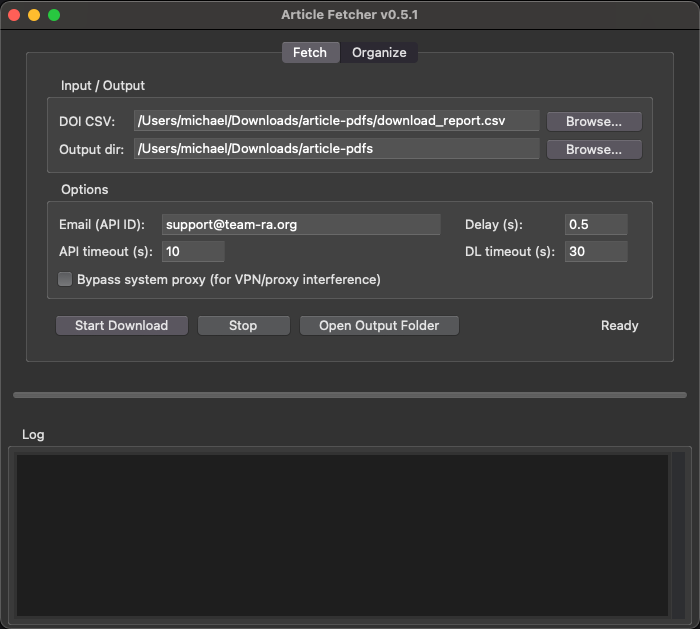
After screening, export the DOI list from the relevant-articles toolbar and use ArticleFetcher v0.5.1 to download open-access PDFs. The window title should read Article Fetcher v0.5.1. If you still have an older copy, download again and replace it.
Download ArticleFetcher v0.5.1:
- Windows: China · International
- macOS: China · International
You can also use the Windows / macOS links next to “Batch PDF download tool” on Step 4 in the assistant.
- Click Export DOIs and save the CSV (number, title, DOI, suggested filename).
- Download ArticleFetcher from the links above (or from the Step 4 toolbar).
- Open the Fetch tab:
- DOI CSV: the file you just exported
- Output dir: the folder where PDFs should be saved
- Email (API ID): an email for Unpaywall
- Check Bypass system proxy if a VPN or proxy blocks downloads
- Click Start Download. When it finishes, the same folder contains
download_report.csv. - Back in Step 4, click Import Batch Results and select
download_report.csvto mark which articles have full text.
Paywalled or failed items can still be marked by hand in the table. To split PDFs into included/excluded folders after appraisal, use Step 7 Organize.